How to Monetize Offline and On-Premises Software in a SaaS-First World

If you read only software marketing, you’d think every application lives in a browser tab and every server sits in a public cloud. Then you visit a customer: a CNC machine on a factory floor, a lab instrument that’s deliberately unplugged from the network, a ship’s navigation system mid-Atlantic, an engineering workstation in a defence contractor’s air-gapped building.
That software is very much alive, often business-critical and often expensive. It just can’t, or isn’t allowed to, phone home. Monetizing it takes a bit more thought than a SaaS checkout, but it’s entirely doable.
Key takeaways
- Offline software still matters in manufacturing, healthcare, defence, research, transport and anywhere security policies forbid outbound connections.
- There are three main offline approaches: cached validation results, signed license files and a local license server.
- Node-locked licenses work well offline once activated. Floating licenses need a local server.
- Subscriptions work offline too, but your application needs a policy for expiry and clock changes.
- Hybrid architectures keep the cloud as the source of truth while serving isolated sites locally.
Why offline software still matters
There are a few common reasons a customer’s software can’t rely on a connection:
- Security policy: air-gapped networks in defence, critical infrastructure, finance and research.
- Physical environment: ships, mines, remote sites, vehicles, factory floors.
- Regulation: validated systems where any outside connection triggers a compliance review.
- Reliability: production lines that must not stop because a licensing call timed out.
For these customers, “requires an internet connection” can rule your product out entirely.
Online vs. offline activation
Online activation is the default: the application validates against the license service, gets the current state and stores it. It’s simple, always up to date, and revocations or renewals take effect quickly.
Offline activation replaces the live call with something the application can check locally. The trade-off is always the same: the more independent the application is, the longer changes in the cloud take to reach it.
Three ways to validate without a connection
NetLicensing supports all three. The offline license validation guide has the full details.
| Situation | Approach | How it works |
|---|---|---|
| Usually online, sometimes offline for hours or days | Cached validation | Each validation response carries a ttl; the application reuses the last result until then |
| A single machine offline for weeks or for good | Signed offline file | A validation response signed with your private key; the application checks it with the public key it carries |
| An isolated network with many clients | Local license server | The NetLicensing Agent runs inside the customer’s network and answers validation requests in place of the cloud |
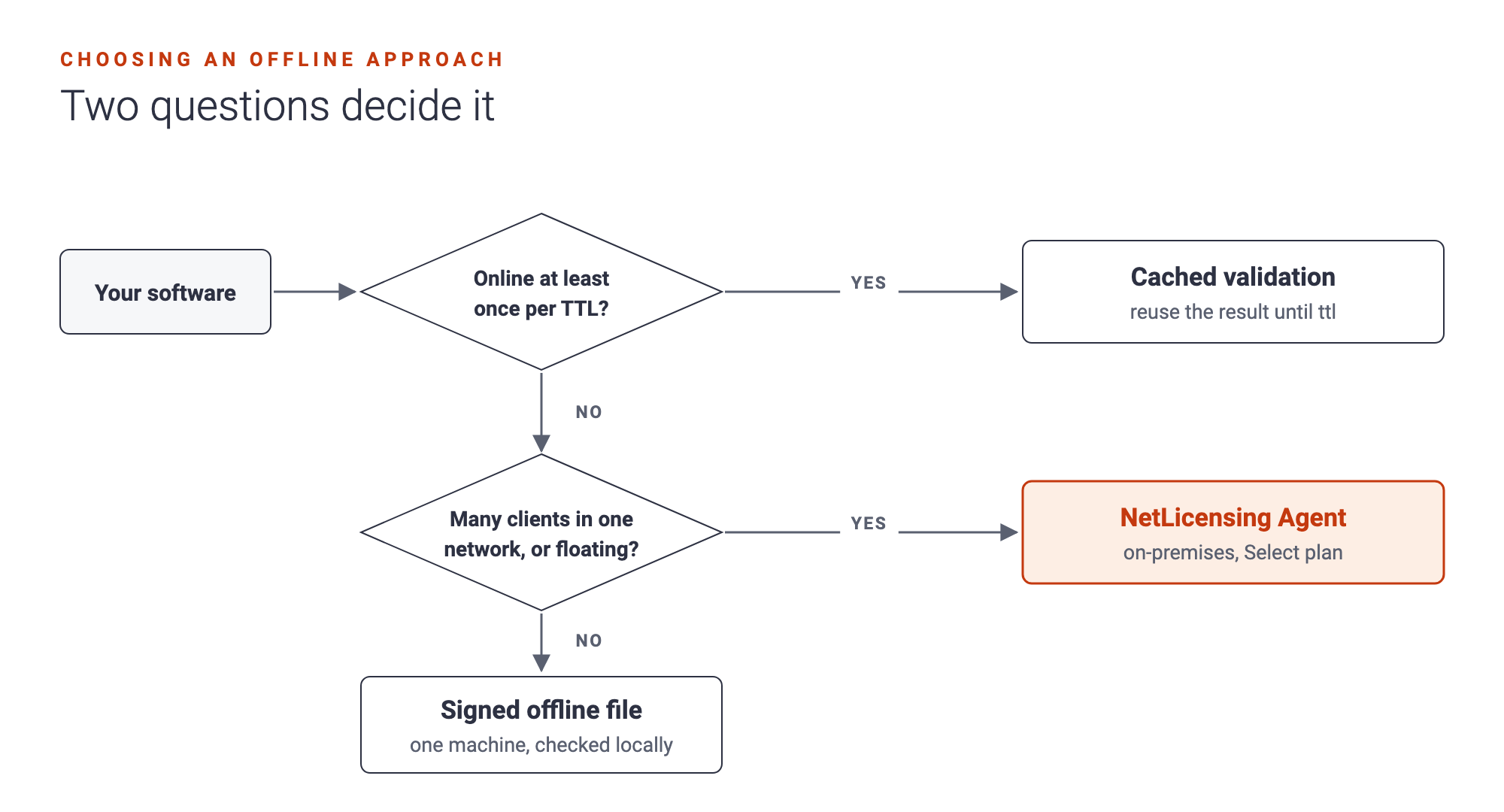
Cached validation covers short outages for almost any product. You set the validity interval in the Management Console, from minutes to several days. Store the signed response exactly as received and check its signature on every load, or a user could simply edit the expiry date.
Signed offline files suit single machines that never connect. You create the file for a customer in the Management Console or via the API and deliver it with your software. The application checks the RSA signature, and if it’s valid, the client library returns an ordinary validation result. The file is a snapshot, so a renewal means sending a new file.
The NetLicensing Agent is a Java server that runs on the customer’s premises. Your applications point at it instead of the cloud and send exactly the same requests. You export the customer’s licensing data on a connected machine, carry it into the isolated network and import it. When something changes, such as a renewal or a new license, you repeat the export and import. The Agent is part of the Select plan.
Node-locked and floating licenses offline
Node-locked licenses bind software to specific devices, which makes them a natural fit for offline use: once a device is bound, nothing about the decision changes until you change it. With signed offline files, bind the device fingerprints before you create the file.
Floating licenses count concurrent sessions. That requires someone to keep count, so they need either a connection or a local server. With the NetLicensing Agent, sessions are checked out and in locally.
Usage-based models are the hardest case offline, because usage has to be counted somewhere. If you meter usage, store it locally and report it once a connection is available.
Subscriptions without permanent connectivity
A subscription has an end date, and an offline application has a local clock. That’s the whole challenge.
- The validation result (cached, signed file or from the Agent) contains the expiry date. Your application compares it with the local clock.
- Decide what happens after expiry. A grace period, read-only mode or a clear prompt to renew. Factory software that stops mid-shift is a bad customer experience; read-only or a grace period is usually wiser.
- Watch for clock tampering. Remember the latest time your application has seen and treat a big jump backwards as suspicious. The NetLicensing FAQ on clock changes has practical advice.
- Plan the renewal path. For a signed file, the customer receives a new one after renewing. For the Agent, the next export and import carries the renewal in.
Security: what signatures protect, and what they don’t
Signed responses and files can’t be forged without your private key. Keep that key in your own secure environment and build the public key into your application, not into a separate file someone could swap.
A signature protects licensing data, not your code.
Be honest about the limits, though. Someone who patches the binary to skip the check bypasses any licensing system. Combine licensing with whatever code protection your platform offers.
Hybrid cloud and on-premises architecture
The most robust setup keeps one source of truth, in the cloud, and moves only the decision closer to the software:
- Products, customers and licenses are managed centrally in NetLicensing.
- Connected installations validate online and cache results.
- Occasionally disconnected installations rely on cached results until their
ttl. - Permanently offline machines get signed files.
- Isolated networks run the Agent, refreshed by export and import.
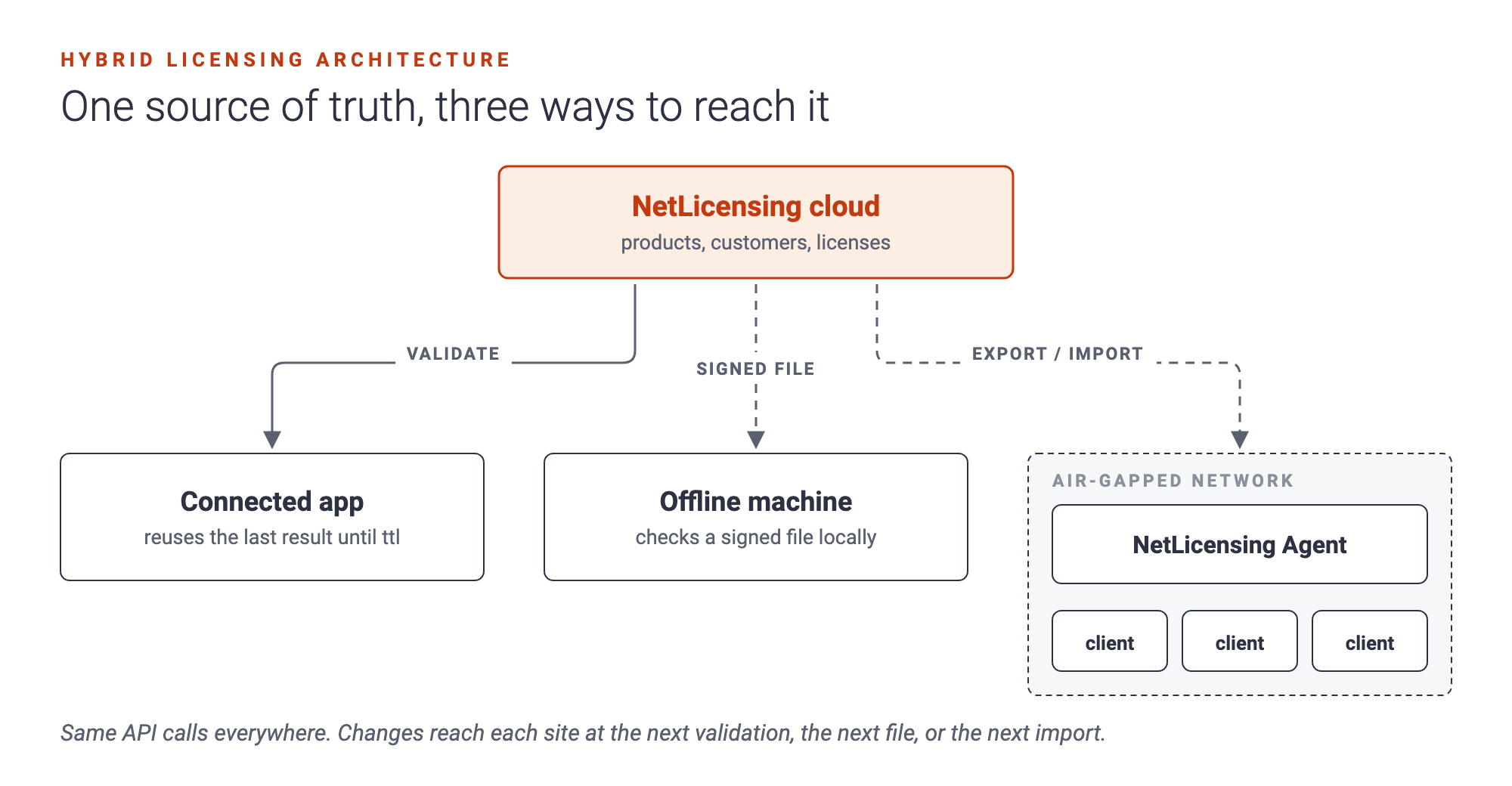
Your sales team sells one product, your support team sees one licensing state, and your application uses the same API calls everywhere.
Questions people ask
How do I implement offline license validation? Use cached validation results for short outages, signed offline license files for single machines that stay offline, and a local license server for isolated networks with several clients.
Can floating licenses work offline? Only with a local license server that tracks sessions, such as the NetLicensing Agent inside the customer’s network.
How do subscriptions expire on offline machines? The application compares the expiry date in its signed validation result with the local clock and applies your expiry policy. Protect against clock rollback.
Can licenses be revoked offline? A revocation reaches the machine the next time it gets fresh data: an online validation, a new signed file or a new Agent import. Choose cache lifetimes with that delay in mind.
Bring your offline customers into the fold
Offline customers are often your most loyal ones, and the ones competitors with “cloud-only” licensing can’t serve. Cached validation and signed offline files need nothing beyond your normal NetLicensing integration; the on-premises Agent is part of the Select plan. Get in touch and tell us about your environment.
Happy Licensing!
Image Credits: NetLicensing
Related Posts


Decoupling Software Licensing from Your Application: Architecture, Benefits and Best Practices