From Free Trial to Paying Customer: How Software Licensing Drives Conversion
A trial is the most honest sales pitch you have. Nobody reads your feature list as closely as someone who’s actually using the product. And yet many trials are set up as an afterthought: a hard-coded “30 days” in the code, a nag screen on day 29, and a payment form that asks the user to retype everything they’ve just told you.
Licensing usually gets treated as the lock at the end of the trial. It can do much more than that, and it shapes how many trial users turn into paying customers.
Key takeaways
- Free trial, freemium and evaluation are three different strategies. Pick the one that matches how quickly your product shows its value.
- Limit trials with time or features, but never in a way that hides the product’s core value.
- The moment of conversion should take one click: the trial knows who the user is, so the upgrade should too.
- Promo codes and promotional periods work best when they’re part of the licensing system, not a manual workaround.
- Measure conversion with events: trial started, license bought, trial expired.
Free trial vs. freemium vs. evaluation
| Free trial | Freemium | Evaluation license | |
|---|---|---|---|
| What the user gets | Full or near-full product, for a limited time | A limited product, for free, for good | A time-limited license, often for a specific customer |
| Ends with | A purchase decision | Nothing, but upgrades are offered | A sales conversation |
| Best for | Products that show value within days | Products with viral or habit-forming use | Enterprise and B2B software |
| Main risk | Too short to reach the “aha” moment | Free users who never need to pay | Long sales cycles |
| Licensing needs | Automatic start, expiry, upgrade path | Free plan plus paid plans and add-ons | Licenses created by sales, with custom terms |
None of them is better in general. A design tool that delights in ten minutes can run a 14-day trial. A data platform that needs a week of setup should probably give a longer evaluation, or a free plan.
Feature restrictions during trials
The most common trial mistake: restricting the very feature people came to try.
If your product’s value is in exporting, a trial without export proves nothing.
Better patterns:
- Full product, limited time. Simple, and the user sees everything.
- Full product, limited volume. For example 50 processed documents, then pay.
- Core product free, premium features paid. That’s freemium, with feature-based upsells.
- Single-feature trials. An existing customer tries one add-on for two weeks before buying it.
In NetLicensing, each of these is configuration: a time-limited evaluation in Try & Buy, a free starting period in Subscription, a free plan or a plan with a trial in Pricing Table, and a free feature handout in Multi-Feature.
Starting trials automatically
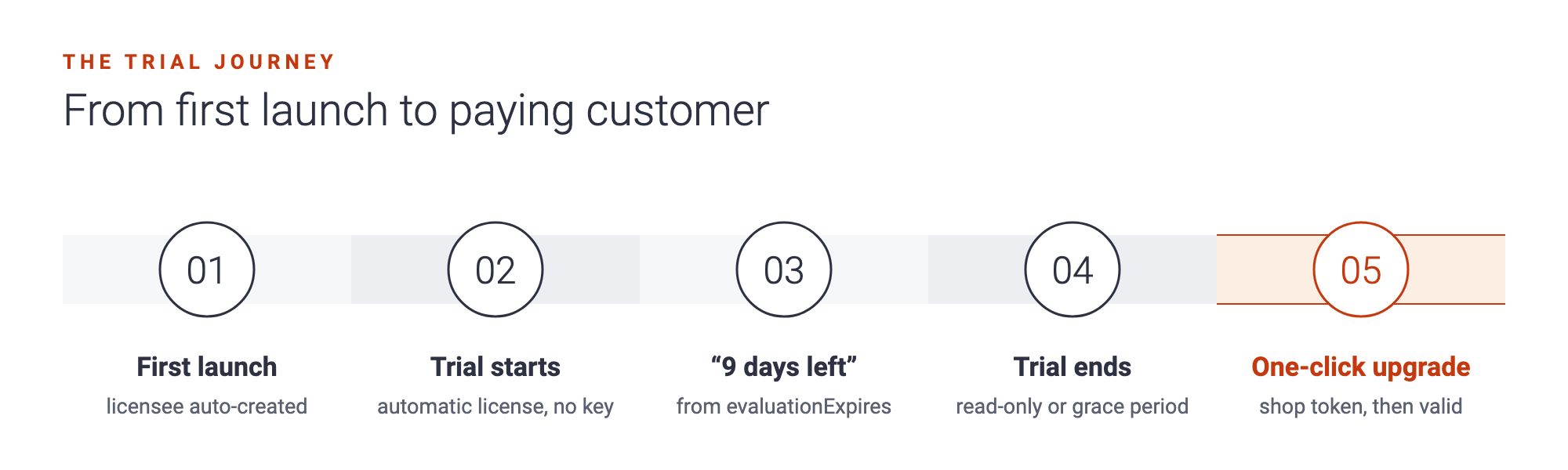
Friction kills trials before they start. If the user has to request a key, wait for an email and copy it into a dialog, a share of them won’t get that far.
With licensee auto-create, NetLicensing creates the customer on the first validation, and automatic license templates hand out the trial at the same moment. The user installs, opens the app and is in the trial. No key, no form. For a 14-day Try & Buy trial, validation then tells you two things: evaluation=true and evaluationExpires, which you can use to show “9 days left” in the interface.
Expiry and the upgrade moment
When the trial ends, validation returns valid=false. What happens next is up to you, and it matters:
- Read-only mode lets users still see their work, and is a strong reason to buy.
- A grace period gives a few extra days to finish what they were doing. The Subscription model supports one natively.
- A hard stop is clear, but frustrating if it hits mid-task.
Whatever you choose, make buying a single click. Your application already knows the customer, so it can request a shop token for them and open the shop with their identity in place. After payment, the next validation returns the new license. There’s no key to send and nothing to reinstall. If the trial was a subscription trial, the paid period simply continues from there.
Discounts and promotional periods
Promotions are conversion tools too: a launch discount, a “convert before your trial ends” offer, a seasonal campaign. They work best when they’re part of checkout instead of a manual exception.
NetLicensing’s Discount model handles promo codes in the shop: a percentage or fixed amount off, optional start and end dates, and an optional minimum cart total. A code that only works during a campaign window, or only above a certain order size, needs no extra code on your side.
Measuring trial-to-paid conversion
You can’t improve what you don’t measure. At minimum, track:
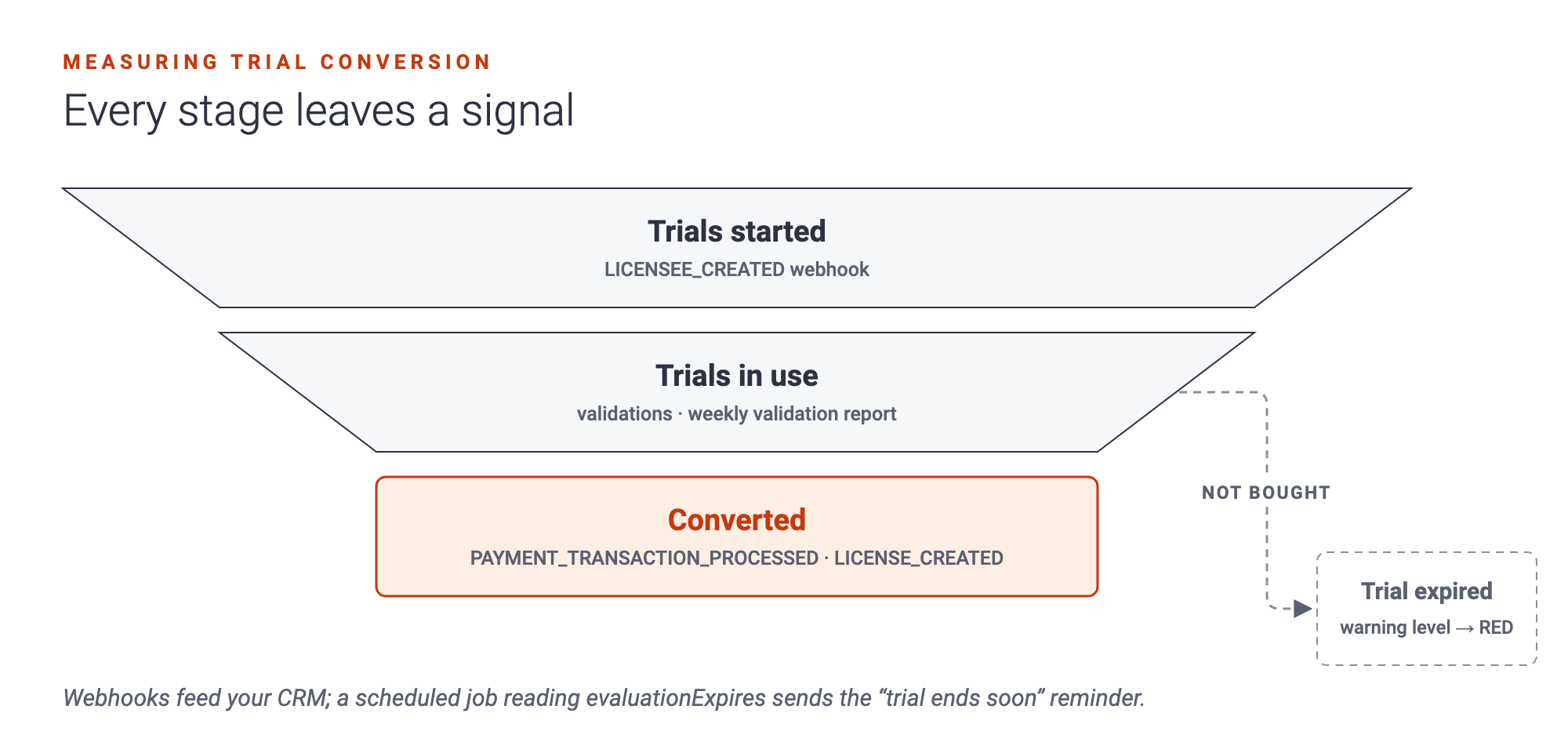
- Trials started: new customers created.
- Active trial users: customers who validated during the trial, meaning they actually used the product.
- Conversions: licenses purchased by trial customers.
- Expired trials: customers whose trial ran out without a purchase.
NetLicensing can send webhook notifications for the events behind most of these numbers: a new licensee, a processed payment, a new license and a change in warning level. In Try & Buy, the warning level turns red when a trial has run out without a purchase. Connect the webhooks to your CRM and you see where trial users drop off. For a “your trial ends in three days” email, a small scheduled job that reads evaluationExpires does the job.
A checklist for better trial conversion
- Trial length matches the time it takes to see real value.
- The core value is available during the trial.
- The trial starts without a manual key.
- The app shows how much trial time is left.
- Expiry is graceful: read-only mode or a grace period.
- Upgrading takes one click, with the customer already identified.
- Promo codes run through checkout, not support tickets.
- Every step leaves a signal you can measure.
Questions people ask
How long should a software free trial be? Long enough to reach the moment the product proves its value. For simple tools that may be 7 to 14 days; for products that need setup, longer, or a free plan.
Should I ask for a credit card before the trial? It filters out casual sign-ups but lowers the number of trials. If your product converts well once people try it, keep the start frictionless.
What’s the difference between freemium and a free trial? A free trial is the full product for a limited time. Freemium is a limited product for an unlimited time.
Can a trial continue seamlessly into a subscription? Yes. With an automatic free period in a subscription, the paid period starts where the free period ends, and the customer’s identity stays the same.
Make your trial work harder
Try & Buy, Subscription and Discount are available on every NetLicensing plan, including the free one. Create your free account and set up a trial that starts on its own and converts with one click.
Happy Licensing!
Image Credits: NetLicensing
Related Posts
Decoupling Software Licensing from Your Application: Architecture, Benefits and Best Practices