How to Offer Discounts on Software Products: Promo Codes, Campaigns and Minimum Cart Totals
A well-timed discount can turn a hesitant prospect into a customer. It can give a launch some momentum, help a partner close a deal, or give existing customers a reason to upgrade.
Then comes the less glamorous part: someone has to make the promotion work. Who is eligible? When does it end? What happens to the cart total? And how do you do all that without touching your regular prices? Handled by hand, even a simple promotion turns fiddly fast.
This guide covers the practical side: which discount types exist, how to plan a campaign, and how the Discount licensing model in NetLicensing handles the mechanics at checkout.
Key takeaways
- A percentage discount scales with the order; a fixed discount gives the same value on every order.
- A good campaign has a clear goal, an end date and, where it makes sense, a minimum cart total.
- In NetLicensing, a discount is a license template in a Product Module that uses the Discount licensing model.
- Discounts apply at checkout in NetLicensing Shop and never change the regular prices of your license templates.
- A discount is not a subscription price schedule. A “cheap first term, then full price” offer needs separate planning.
Why offer discounts on software?
Software discounts are useful for more than one-off sales events. They can support different stages of the customer journey:
- Launch a new product — give early adopters an incentive to try something new
- Create seasonal interest — run a Black Friday, Cyber Monday, Cyber Weeks, or year-end campaign
- Reward partners — provide a dedicated offer to resellers, affiliates, or integration partners
- Encourage larger orders — make a discount available once a cart reaches a certain value
- Re-engage prospects — give a customer who has been considering a purchase a reason to act
The important part is to know what you want the promotion to achieve. A discount that brings in new customers is not necessarily the right one for increasing average order value. Start with the goal, then choose the mechanics.
Choose the right type of discount
Most software promotions can start with one of two simple approaches: a percentage off or a fixed amount off.
Percentage discount
A percentage discount scales with the purchase amount.
For example, a 20% launch offer on a €100 purchase reduces the checkout total by €20. On a €500 purchase, it reduces it by €100.
Percentage discounts are easy to communicate and work well for broad campaigns where the same offer should apply to purchases of different sizes.
Typical uses:
- Seasonal promotions
- Product launches
- First-purchase incentives
- General newsletter or community offers
Fixed-amount discount
A fixed discount subtracts a specific amount from the cart.
For example, a €50 partner discount reduces an eligible purchase by €50, whether the cart total is €300 or €600.
Fixed discounts can be useful when you want to offer a clear monetary incentive or support a particular partner arrangement.
Typical uses:
- Partner and reseller campaigns
- A fixed-value customer voucher
- Incentives tied to a minimum purchase amount
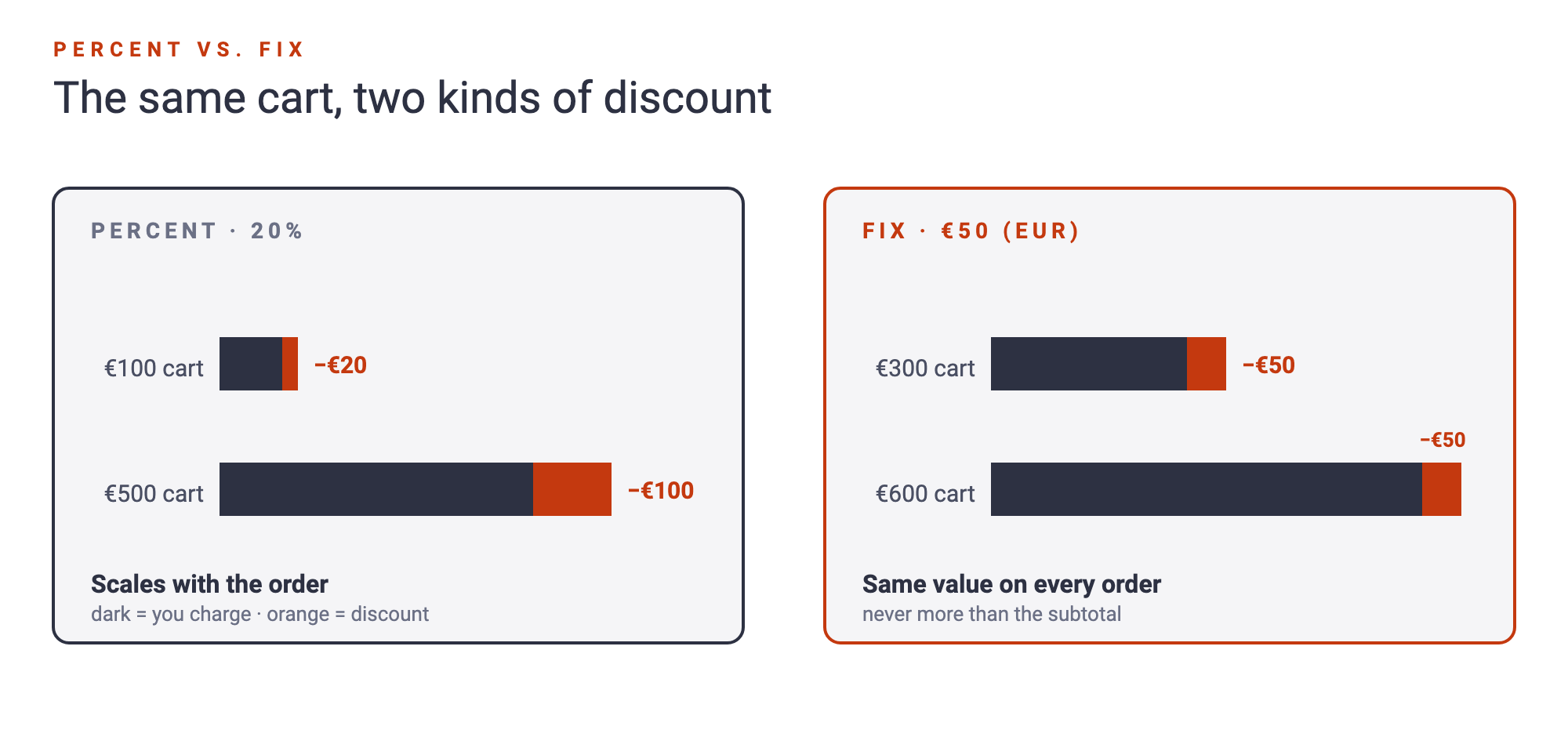
Percentage discounts scale with the order. Fixed discounts keep the incentive predictable.
Percentage (PERCENT) | Fixed amount (FIX) | |
|---|---|---|
| Value of the discount | Grows with the cart | Same on every order |
| Needs a currency | No | Yes, matching the Shop cart currency |
| Good for | Seasonal and launch campaigns | Partner vouchers, minimum-spend offers |
| Watch out for | Large carts get a large discount | Capped at the cart subtotal |
Three practical promotion examples
Let’s make this concrete. Imagine you sell a desktop application, a developer tool, or a SaaS product through an online checkout.
1. Seasonal campaign
You want to run a Cyber Weeks promotion for two weeks.
| Setting | Example |
|---|---|
| Cart subtotal | €200 |
| Discount type | Percentage |
| Discount | 26% |
| Promo code | CYBER26 |
| Campaign period | November 23–December 6 |
A customer enters CYBER26 at checkout during the campaign and gets 26% off the cart subtotal: €52 on a €200 cart. Start and end dates control when the code can be used, and outside that window the regular price is what customers see.
2. Partner offer
A technology partner wants to offer its audience a special deal.
| Setting | Example |
|---|---|
| Discount type | Fixed amount |
| Discount | €50 |
| Promo code | PARTNER50 |
| Minimum cart total | €300 |
| Currency | EUR |
The minimum cart total keeps the offer aligned with the agreement: below €300, the code does not apply. The partner shares the code with their audience, and you do not need to create a separate product price for them.
3. Product launch
You are launching a new edition of your software and want to reward early adopters.
| Setting | Example |
|---|---|
| Discount type | Percentage |
| Discount | 20% |
| Promo code | LAUNCH20 |
| Start date / end date | Launch day and 30 days later |
Early adopters get a reason to buy now, and your standard price stays exactly as it was.
These are illustrative examples. Choose discount values and eligibility conditions based on your margins, product economics, and campaign goals.
What to think about before launching a promotion
A promo code is only one part of a good offer. A few decisions up front can prevent confusion later.
Set a clear validity period
A start and end date make a campaign easier to manage and remove the need to switch an offer off by hand. Both are optional in NetLicensing, so set them on purpose: without an end date the code stays usable. If the deadline matters, state the exact end date in your announcement.
Consider a minimum cart value
A minimum cart total can make a discount conditional on a larger purchase. For example, a €50 discount might only apply to carts of €300 or more.
This can help protect margins and encourage customers to choose a larger package.
Keep your regular prices intact
A temporary promotion should not require rewriting your standard pricing. Apply the discount at checkout and leave your product and license-template prices as they are. You can then run campaign after campaign without turning your price list into a history of old promotions.
Make codes easy to use
A code should be easy to read, share and type. Avoid look-alike characters such as 0 and O, and use a naming convention (CYBER2026, PARTNER50) so your team recognizes each offer. State the terms next to the code: what it covers, when it ends and whether a minimum order applies.
Automate software discounts with NetLicensing
This is where the Discount licensing model in NetLicensing comes in.
The model is designed for promotional discounts applied during checkout in NetLicensing Shop. Instead of building your own promo-code rules, you configure each offer as a license template in a Product Module that uses the Discount licensing model.
Each template defines the offer and its conditions:
- Promo code — the code a customer enters at checkout
- Discount type — either a fixed amount (
FIX) or a percentage (PERCENT) - Discount amount — the amount or percentage to subtract
- Discount currency — required for a fixed-amount discount, matching your checkout cart currency
- Start and end dates — optional dates that control when the offer can be used
- Minimum cart total — an optional minimum subtotal required for the discount to apply
NetLicensing Shop includes a promo-code field and applies an eligible discount to the cart. Your customers can use the offer as part of the normal checkout process.
And importantly, a Discount offer does not change the regular prices of your product’s license templates. It is a checkout discount, not a permanent price change.
Set up a discount
At a high level:
- Make sure the product has a Product Module that uses the Discount licensing model. Create one if it does not.
- Add a license template to that module for each offer.
- Set the promo code, discount type, amount and any optional conditions.
You can have several discount templates on one product, for example one for a seasonal campaign and one for a partner offer. Each active promo code must be unique across the Discount modules of the same product. For codes customers use in Shop, stick to letters, numbers, @, +, &, $, :, ., - and _.
A few rules from the model worth knowing: percentage values range from 0 to 100, a fixed discount needs a currency, and the end date cannot be before the start date.
Create a discount with the REST API
If you prefer to manage licensing configuration in code, you can create a Discount Product Module and its license template through the NetLicensing REST API.
First, create a Product Module configured with the Discount licensing model:
POST https://go.netlicensing.io/core/v2/rest/productmodule
Accept: application/xml
Content-Type: application/x-www-form-urlencoded

productNumber=PRODUCT-01&number=DISCOUNT-MODULE-01&name=Promo+discounts&licensingModel=Discount
Then create a license template for the offer:
POST https://go.netlicensing.io/core/v2/rest/licensetemplate
Accept: application/xml
Content-Type: application/x-www-form-urlencoded

productModuleNumber=DISCOUNT-MODULE-01&number=WINTER10&name=Winter+sale&licenseType=FEATURE&promoCode=WINTER10&discountType=PERCENT&discountAmount=10&minCartTotal=50&startDate=2026-12-01&endDate=2026-12-31
This example creates a 10% discount with a minimum cart subtotal of 50 and a validity period covering December 2026.
For a fixed-amount discount, use discountType=FIX and provide both discountAmount and discountCurrency. For example, a €5 discount uses discountAmount=5 and discountCurrency=EUR.
The Product Module referenced by productModuleNumber must use the Discount licensing model. As with other REST API operations, make sure your API request is authenticated and that the referenced product and module exist.
The Discount wiki page has the complete reference, and the License Template services page covers authentication and the other template operations.
How Shop applies the discount
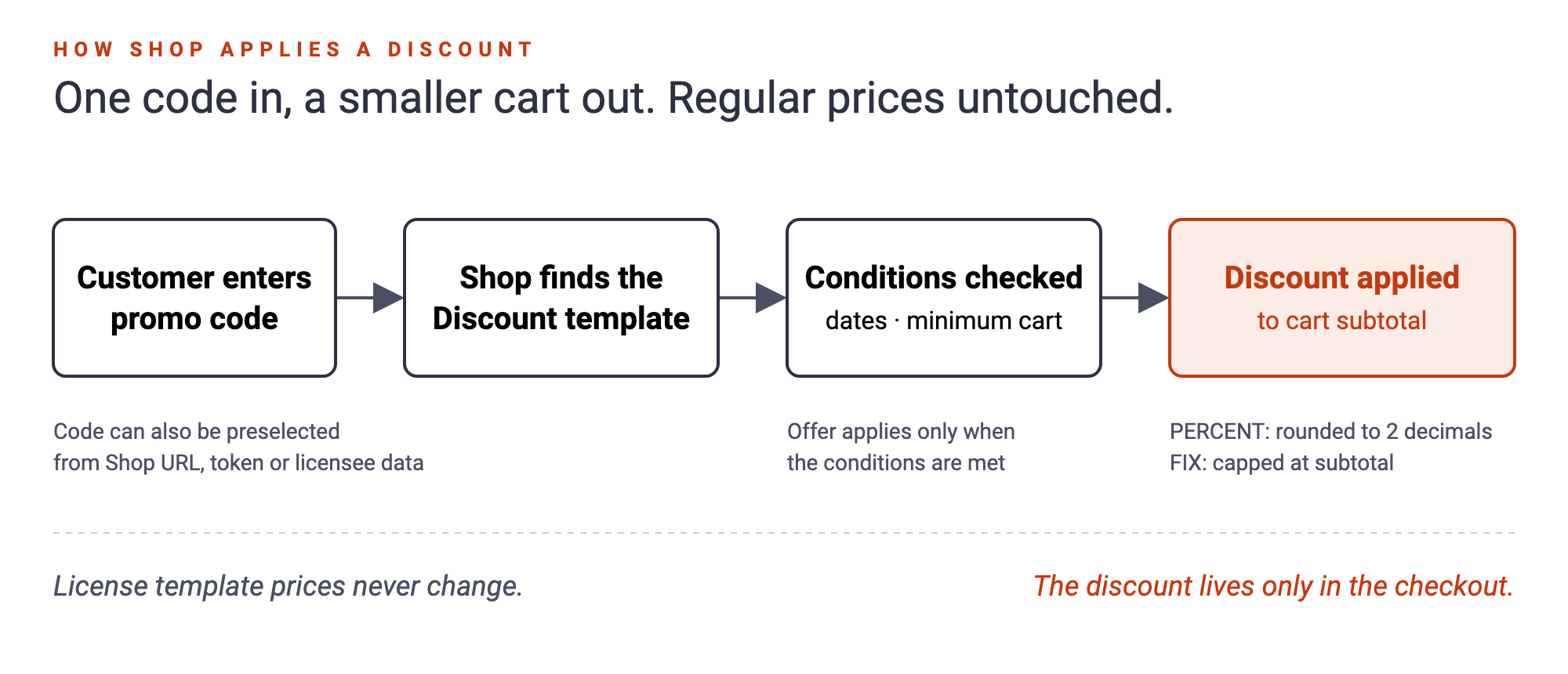
- Shop checks the minimum cart total against the cart subtotal.
- Percentage discounts are calculated from that subtotal and rounded to two decimal places.
- Fixed discounts are capped at the subtotal, so a discount can never push the cart below zero. The discount currency should match the Shop cart currency.
- Shop can preselect a promo code from the Shop URL, the Shop token or licensee data, in that order. A code the customer types in always takes precedence.
The preselected code is handy for campaign links: send people to a Shop link that already carries the code, and they can still replace it with another one.
A note on discounts and subscriptions
A checkout discount and a subscription’s recurring price are different things.
The Discount licensing model applies an eligible discount to the Shop cart. It does not rewrite the prices stored in your license templates, and it is not a mechanism that turns a discounted subscription into a full-price one after a promotional period. If your offer is a special first term followed by renewals at the regular price, design and configure that lifecycle separately, and tell customers the initial charge, the renewal price and the renewal date.
A promotion checklist
- Start with a goal. Acquire customers, raise order value, reward partners or support a launch?
- Keep it simple. One clear benefit and an easy code beat complicated conditions.
- Set an end date. Dates are optional in NetLicensing, so don’t leave a campaign running by accident.
- Check the currency. A fixed discount needs a currency that matches the cart.
- Test the whole checkout. Try a valid code, an expired code, a cart below the minimum and a cart that qualifies.
- Say what the terms are. Eligibility, dates and renewal conditions.
- Measure. Compare redemptions, conversion, average order value and revenue after the campaign.
Questions people ask
What is the Discount licensing model in NetLicensing? A model for promo-code discounts at checkout. Each license template defines a code, a fixed or percentage discount, and optionally start and end dates and a minimum cart total. NetLicensing Shop supports it directly.
Does a discount change my product prices? No. Discounts apply at checkout and do not change the regular prices of your license templates.
Can I offer a fixed-amount discount? Yes. Use discountType=FIX with discountAmount and discountCurrency. The currency should match the Shop cart currency, and the discount is capped at the cart subtotal.
Can I require a minimum order? Yes, with the optional minimum cart total (minCartTotal). Shop checks it against the cart subtotal.
Can the same promo code be used twice? Each active promo code must be unique across the Discount modules of a product, so two active offers cannot share a code.
Can I send customers a link with the code already filled in? Shop can preselect a code from the Shop URL, the Shop token or licensee data. A code the customer enters takes precedence.
Put your next promotion to work
Seasonal sale, partner offer or product launch: promotions are easier to run when they are part of your licensing and checkout setup, not a pile of exceptions in code. Read the Discount licensing model documentation, look at the other licensing models, or sign up for free and create your first offer.
Cyber Weeks inspiration
We are running the same idea ourselves. From November 23 to December 6, 2026, new customers get 26% off the first year of any paid NetLicensing plan with the code CYBER2026. It covers Basic, Premium and Select, the regular price applies after the first year, and it is not available for upgrades of existing accounts. See the Cyber Weeks 2026 offer.
Happy Licensing!
Image Credits: NetLicensing
Related Posts
Decoupling Software Licensing from Your Application: Architecture, Benefits and Best Practices