Lemon Squeezy Shutting Down: Migrate Your License Keys

A customer reinstalls your app on a Friday evening and pastes in the license key they bought last spring. Today, Lemon Squeezy answers. The question for the coming months is who answers after your move.
On November 16, 2026, Lemon Squeezy announced that it is winding down. New store sign-ups closed the same day, and Lemon Squeezy stops processing payments, including subscription renewals, on March 31, 2027. Until then, your store keeps working as usual. The deadline won’t be extended.
If your product checks Lemon Squeezy license keys, you have two things to move: the payments and the licenses. Lemon Squeezy’s own migration path covers the payments. This guide is mostly about the licenses, which that path leaves out.
Key takeaways
- Lemon Squeezy stops processing payments on March 31, 2027, and recommends starting your migration by mid-January.
- Its recommended destination, Stripe Managed Payments, does not deliver license keys.
- You can use each existing key as a NetLicensing licensee number, so customers keep the key they have.
- Your application still needs an update, because it has to call a different API.
- NetLicensing is not a merchant of record. Decide who handles payments and tax before you switch.
Lemon Squeezy’s official migration path
Everything in this section comes from Lemon Squeezy’s migration guide, its feature comparison and the announcement.
| Date | What happens |
|---|---|
| November 16, 2026 | New users and new store sign-ups closed |
| December 2, 2026 | Migration tooling for Stripe Managed Payments opens for eligible stores |
| Mid-January 2027 | Recommended latest start; the full process can take up to 8 weeks |
| March 31, 2027 | Lemon Squeezy stops processing transactions, including subscription renewals |
There are two routes:
- Stripe Managed Payments. This is a merchant-of-record service, but only for businesses based in the countries Stripe lists, selling digital products directly. The tooling creates your products in Stripe, moves customers, maps Lemon Squeezy customer IDs to Stripe customer IDs, and moves eligible subscriptions after giving customers at least 14 days’ notice. Most card subscriptions move without customers re-entering their payment details. It works with Stripe Checkout and Payment Links, so Lemon Squeezy checkout overlays or a custom checkout need updating.
- Another provider. Lemon Squeezy says that “only subscriptions paid by card can be migrated to another provider”. To transfer data or card subscriptions, you fill in the intake form in your Lemon Squeezy account under Settings > Migration.
On either route, PayPal subscriptions can’t migrate, and cards issued in India need reauthorization. Lemon Squeezy also points out that if your new provider is not a merchant of record, your business becomes responsible for tax compliance in every jurisdiction that applies.
What the migration does not include, according to Lemon Squeezy’s comparison:
| Lemon Squeezy feature | Moves to Managed Payments? | Lemon Squeezy’s advice |
|---|---|---|
| License keys and digital fulfillment | No | “Connect a fulfillment or licensing app, or build your own integration” |
| Storefront | No | Plan a replacement |
| Affiliates | No | “Connect an affiliate platform” |
| Email marketing | No | Plan a replacement |
| PayPal | No | Not currently supported on Managed Payments |
The guide doesn’t mention the License API, the one your application calls to activate and validate keys. Nothing we read says whether it keeps answering after March 31, 2027, so plan for your application to stop depending on it before then.
Your customers don’t care who processes the payment. They care that the key still works on Monday.
How keys map to NetLicensing
NetLicensing has no separate “key” object. Each customer, installation or account is a licensee with a number, and you choose that number. Set it to the existing Lemon Squeezy key. Your application sends it on validation, and NetLicensing checks the licenses stored for it.
The left column uses the fields of Lemon Squeezy’s license key object.
| Lemon Squeezy field | NetLicensing | Notes |
|---|---|---|
key | Licensee number | Unique across all your products |
user_name | Licensee name | Import only the personal data you need |
expires_at empty | Try & Buy feature license | Lemon Squeezy uses an empty value for perpetual keys; see perpetual licenses |
expires_at set | Subscription license | Import the days that remain |
activation_limit | Node-Locked quota | Needs the Premium or Select plan |
status inactive or active | Import | Both are valid keys; inactive means no activations yet |
status expired or disabled | Skip, or import as inactive | Decide before the run |
Check keys that were sold as subscriptions. If expires_at is empty on one of them, take the end of the paid period from your subscription data. Don’t import it as perpetual.
Step 1: Export your license keys
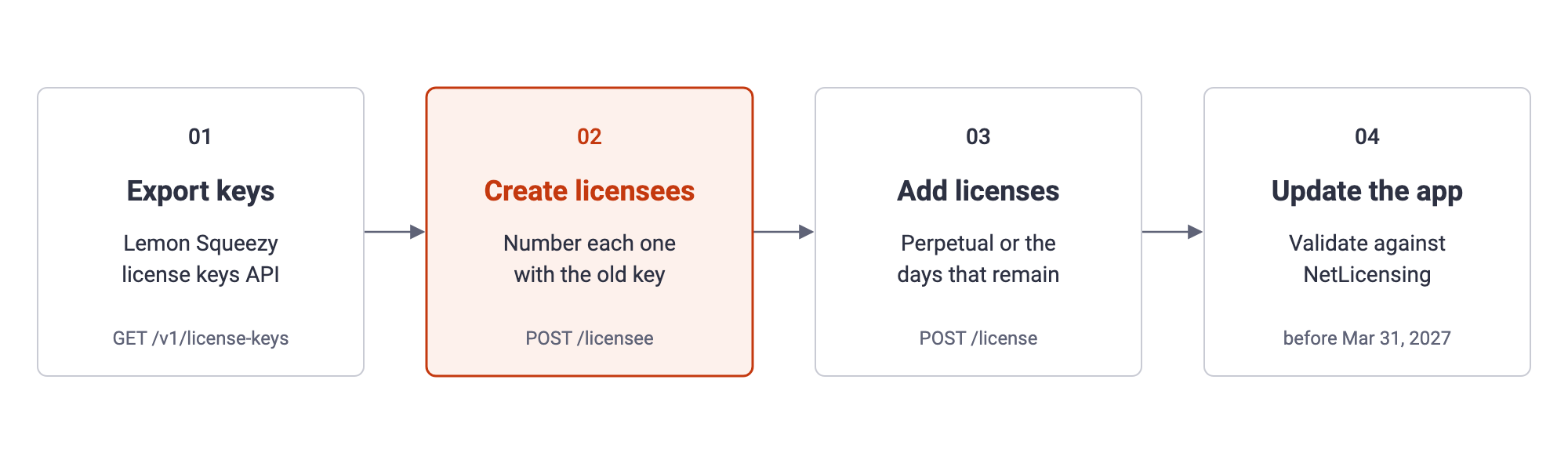
Lemon Squeezy’s checklist asks you to back up your customers, orders and subscriptions. Its documented order export is a CSV sent to the store owner’s email, and its columns don’t include license keys.
For keys, use the API endpoint GET /v1/license-keys. It needs a Lemon Squeezy API key and returns each key with its customer, status, activation limit and expiry date. Results come in pages of up to 100 (page[size]); keep following links.next until it is missing. You can filter by store_id, product_id or status.
The export contains customer data and working keys. Store it as you would store passwords, and delete it when the migration is done.
Step 2: Prepare your products
In the Management Console, create a product, a module for each licensing model you need, and a license template for each thing you sold. Note the product number and template numbers. Create an API key with the operation role for the import, and keep it on your own machine.
Step 3: Import the keys
The script below reads the keys and creates one licensee and one license for each valid key. It uses only the Python standard library. Fill in PLANS with your own Lemon Squeezy product IDs and NetLicensing template numbers.
import base64, json, math, os, urllib.error, urllib.parse, urllib.request
from datetime import datetime, timezone

LS = "https://api.lemonsqueezy.com/v1/license-keys?page%5Bsize%5D=100"
NL = "https://go.netlicensing.io/core/v2/rest"
PRODUCT = "YOUR_PRODUCT_NUMBER"
# Lemon Squeezy product_id -> (kind, NetLicensing license template number)
PLANS = {
    111111: ("perpetual", "YOUR_FEATURE_TEMPLATE"),
    222222: ("subscription", "YOUR_TIMEVOLUME_TEMPLATE"),
}
DRY_RUN = os.environ.get("DRY_RUN", "1") == "1"

def ls_keys():
    url = LS
    while url:
        request = urllib.request.Request(url, headers={
            "Accept": "application/vnd.api+json",
            "Content-Type": "application/vnd.api+json",
            "Authorization": "Bearer " + os.environ["LS_API_KEY"]})
        with urllib.request.urlopen(request) as response:
            page = json.load(response)
        for item in page["data"]:
            yield item["id"], item["attributes"]
        url = page.get("links", {}).get("next")

def create(path, fields):
    token = base64.b64encode(("apiKey:" + os.environ["NL_API_KEY"]).encode()).decode()
    request = urllib.request.Request(
        NL + path, data=urllib.parse.urlencode(fields).encode(),
        headers={"Accept": "application/json", "Authorization": "Basic " + token})
    try:
        urllib.request.urlopen(request).close()
    except urllib.error.HTTPError as error:
        body = error.read().decode()
        if error.code != 400 or "DuplicateEntityException" not in body:
            raise RuntimeError(f"{path}: HTTP {error.code} {body}")

now = datetime.now(timezone.utc)
for key_id, key in ls_keys():
    plan = PLANS.get(key["product_id"])
    expires = key["expires_at"]
    if expires:
        expires = datetime.fromisoformat(expires.replace("Z", "+00:00"))
    if not plan or key["status"] in ("expired", "disabled") or (expires and expires <= now):
        print("skipped", key_id, key["status"])
        continue
    kind, template = plan
    if (kind == "subscription") != bool(expires):
        print("check by hand", key_id, "expiry does not match", kind)
        continue
    license_fields = {"number": f"ls-key-{key_id}", "licenseeNumber": key["key"],
                      "licenseTemplateNumber": template, "active": "true"}
    if expires:
        days = math.ceil((expires - now).total_seconds() / 86400)
        license_fields.update(startDate=now.strftime("%Y-%m-%dT%H:%M:%SZ"),
                              timeVolume=days, timeVolumePeriod="DAY")
    if not DRY_RUN:
        create("/licensee", {"productNumber": PRODUCT, "number": key["key"],
                             "name": key["user_name"]})
        create("/license", license_fields)
    print("would import" if DRY_RUN else "imported", key_id, kind)
Run it as it is first: DRY_RUN is on by default and writes nothing. Then set DRY_RUN=0, import a handful of keys and check them in the Console. Running it again is safe, because an existing number is reported by the API as a duplicate and left unchanged. That also means a renewal won’t update a license you already imported, so handle renewals through your payment provider’s webhooks (see Keep subscriptions running).
The script doesn’t set activation limits. If you need them, add a Node-Locked module and a template for each limit, then create that license for the same licensee.
Step 4: Update your application
Customers keep their key, but your app must send it to NetLicensing instead of Lemon Squeezy’s License API. Use an API key with the role ROLE_APIKEY_LICENSEE in anything you ship.
curl --user apiKey:YOUR_LICENSEE_API_KEY \
  --header "Accept: application/json" \
  --data "productNumber=YOUR_PRODUCT_NUMBER" \
  https://go.netlicensing.io/core/v2/rest/licensee/THE-CUSTOMERS-KEY/validate
Lemon Squeezy records each activation as a license key instance with its own instance ID. Those IDs mean nothing to NetLicensing, so the script doesn’t import them. Instead, send a stable machine fingerprint as nodeSecret with Node-Locked validation. In client mode, each device is bound the first time it validates, up to the quota.
Ship the update well before March 31, 2027, so customers have time to install it.
Keep subscriptions running
NetLicensing isn’t a merchant of record. Pick one of these for payments after Lemon Squeezy:
- Stripe Managed Payments. Lemon Squeezy’s tooling moves eligible card subscriptions. Stripe then bills the renewals, so a Stripe webhook has to extend the NetLicensing license. Keep the mapping from Lemon Squeezy to Stripe customer IDs, so each Stripe customer finds its imported licensee. Our Stripe Billing guide shows the calls for your own Stripe subscriptions; test it with Managed Payments before relying on it, since Managed Payments supports only Checkout and Payment Links.
- Another merchant of record or billing platform. Move card subscriptions through Lemon Squeezy’s intake form, then let the new provider’s webhooks create and deactivate licenses. Our billing platform guides cover several providers.
- NetLicensing Shop. Money goes into your own PayPal or Stripe account and you are the seller. The Shop applies EU VAT rules on paid plans, and tax filing remains your job. Existing subscribers buy again here, because Lemon Squeezy’s intake form transfers subscriptions to another provider, not to NetLicensing.
PayPal subscribers can’t be moved by Lemon Squeezy on any route, so contact them in time to buy again.
Pick a plan that fits the import
Each imported key becomes one licensee, which can count toward your plan’s active customer limit, even if one person owns several keys.
| Plan | Active customers included | Relevant licensing models |
|---|---|---|
| Community | 50 | Try & Buy, Subscription |
| Basic | 200, expandable to 500 | Adds Multi-Feature, Pricing Table and Quota |
| Premium | 1,000, expandable | Adds Node-Locked, Floating and Pay-per-Use |
| Select | Customizable | All models |
Community also limits the number of licenses and products, so compare all limits on the pricing page. The 30-day Premium trial keeps the product, module and customer limits, so test with a small batch.
A timeline that leaves room
- Now: export your keys and count customers, card subscriptions and PayPal subscribers. Check whether your business location is eligible for Managed Payments.
- December: import into a test product and build the app update. Lemon Squeezy’s Managed Payments tooling opens on December 2.
- By mid-January: start the payment migration, the latest start date Lemon Squeezy recommends.
- February: release the app update and run the import again to pick up new sales.
- Before March 31: run a final import, connect renewals to NetLicensing and watch validation errors.
Questions people ask
Can my customers keep their Lemon Squeezy license keys? Yes, as identifiers. Create each licensee with the key as its number. The application needs an update so it validates against NetLicensing.
When does Lemon Squeezy shut down? It stops processing payments, including subscription renewals, on March 31, 2027, and won’t extend that date. New store sign-ups closed on November 16, 2026.
Do license keys move to Stripe Managed Payments? No. Lemon Squeezy’s comparison lists license keys as not included and suggests connecting a licensing app or building your own integration.
Is NetLicensing a replacement for everything Lemon Squeezy did? No. It covers licensing and offers a shop that works with your own PayPal or Stripe account. It isn’t a merchant of record.
What happens to device activations? They stay in Lemon Squeezy. Devices bind again when the updated app first validates with Node-Locked licensing.
Start with ten keys
Pick ten real cases: a perpetual buyer, a subscriber, someone with several devices, an expired key. Move those first, and the rest of the migration stops being guesswork. Create a free NetLicensing account to try it, or talk to us if your setup is unusual.
Happy Licensing!
Image Credits: NetLicensing